VF

Victor Frye
Your friendly neighborhood developer
One of my recent challenges has been the software development lifecycle of database changes. In the world of distributed and cloud-native applications, we often see a shift towards distributed data management. Applications own their own data and databases, and in .NET we often use Entity Framework (EF) Core for data access and management. EF Core provides migrations as a way to manage data model changes.
EF Core migrations are awesome. However, they become another set of artifacts you need to manage the lifecycle of:
EF Core stops being just an object-relation mapper (ORM) and becomes a critical part of your application planning, development, and operations. Another tool in that mix is Aspire. If you haven't heard of Aspire, check out the other content on this blog or rest of the web. It's absolutely a must-use component for any developer building distributed applications. And not just for .NET. That said, EF Core and Aspire are a great combo for .NET developers.
A few days ago, this post was completely different. I was going to cover how to build custom actions in Aspire to add new migrations and setup a local worker to apply migrations programmatically with seed data. I have a whole series of posts planned, but as the fast-moving world of open-source software development would have it, the Aspire team released a preview package that does most of this for you: Aspire.Hosting.EntityFrameworkCore. The rest of this post will cover the features of this new package, how to use it, and how it compares to custom implementations.
First, this is a hosting integration. Not to be confused with a client integration, which have already existed. Client integrations are used in your production code to easily interact with both local development resources and runtime cloud resources in a seamless way. Therefore, for EF Core, they were coupled to the database providers: Cosmos DB, SQL Server, Postgres, Oracle, etc. Hosting integrations are used in your Aspire app host. The extra code you write that makes Aspire so special. This new package provides hosting integration code to manage EF Core migrations as a first-class citizen in Aspire app hosts. That includes:
The magic of Aspire is removing friction from the development of distributed applications. I've called it a DevOps toolchain, because one of the core principles of DevOps is automation. Everything Aspire does can be done without Aspire, but it's so much more work. This package is no different.
In the old world, to manage EF Core migrations you would install the dotnet-ef tool and execute commands like dotnet ef migrations add and dotnet ef database update in your terminal. You would have to manage the installation of that tool, the execution of those commands, and the context in which they run (e.g. local development machine, CI/CD pipeline, etc.). Your IDE may have some support for this, but you had to think about migrations. To some of my peers, thinking about anything besides the application code is a distraction or complexity they don't want to deal with.
When Aspire launched, the answer still was a lot of manual work. You could write a custom worker to programmatically execute migrations and wait for its completion before starting your app. However, adding new migrations was limited as you need to provide names for each and or manage the execution of dotnet ef commands yourself. This was a huge improvement over the manual way, but required a lot of custom code and management.
The interaction service and custom actions in Aspire made this even better, as you could prompt for user input like a migration name and provide a custom action, i.e. a button on the dashboard, to execute that action. Awesome! But again, this becomes a lot of custom code to write and maintain. Here is an example:
var builder = DistributedApplication.CreateBuilder(args);

var db = builder.AddPostgres("db")
    .WithPgAdmin();

var loader = builder.AddProject<Projects.Loader>("loader")
    .WithReference(db)
    .WaitFor(db);

builder.AddProject<Projects.WebApi>("webapi")
    .WithReference(db)
    .WaitForCompletion(loader);

loader.WithCommand(
        name: "add-migration",
        displayName: "Add Migration",
        executeCommand: async context =>
        {
            IInteractionService interactionService = context.ServiceProvider
                .GetRequiredService<IInteractionService>();

            if (!interactionService.IsAvailable)
            {
                return CommandResults.Failure("Interaction service is not available.");
            }

            var result = await interactionService.PromptInputsAsync(
                title: "📜 Add EF Core Migration",
                message: "Enter a name for the new migration. It will be added to the Core project using Loader as the startup project.",
                inputs:
                [
                    new()
                    {
                        Name = "Migration Name",
                        InputType = InputType.Text,
                        Required = true,
                        Placeholder = "e.g. AddUserTable",
                    }
                ]);

            if (result.Canceled)
            {
                return CommandResults.Failure("Migration canceled.");
            }

            var migrationName = result.Data[0].Value;
            if (string.IsNullOrWhiteSpace(migrationName))
            {
                return CommandResults.Failure("Migration name cannot be empty.");
            }

            var process = new System.Diagnostics.Process
            {
                StartInfo = new System.Diagnostics.ProcessStartInfo
                {
                    FileName = "dotnet",
                    Arguments = $"ef migrations add {migrationName} --project src/Core --startup-project src/Loader --context AppDbContext",
                    WorkingDirectory = System.IO.Path.GetFullPath(
                        System.IO.Path.Combine(AppContext.BaseDirectory, "..", "..", "..", "..", "..")),
                    UseShellExecute = false,
                    RedirectStandardOutput = true,
                    RedirectStandardError = true
                }
            };

            process.Start();
            await process.WaitForExitAsync();

            return process.ExitCode == 0
                ? CommandResults.Success()
                : CommandResults.Failure($"dotnet ef migrations add failed with exit code {process.ExitCode}.");
        },
        commandOptions: new CommandOptions
        {
            IconName = "DocumentAdd",
            IconVariant = IconVariant.Filled,
            IsHighlighted = true
        });

await builder.Build().RunAsync();
Still with me? This is a lot of code to write and maintain just to add new migrations. Doesn't cover removing bad ones and is on top of using the loader worker to apply migrations on startup.
The new package solves all of this.
The package is in preview, so mind that things may change. However, all but one feature I want is included in this preview. We'll get to the missing one. To use the package, install it via the Aspire CLI:
aspire add entityframeworkcore
Then, in your app host, add the migrations to your application model:
var builder = DistributedApplication.CreateBuilder(args);

var db = builder.AddPostgres("postgres")
    .WithPgAdmin();

var api = builder.AddProject<Projects.WebApi>("webapi")
                 .WithReference(db);

api.AddEFMigrations("migrations", "VictorFrye.Example.Data.AppDbContext")
   .WithMigrationsProject<Projects.Data>()
   .WaitFor(db)
   .RunDatabaseUpdateOnStart();

await builder.Build().RunAsync();
Boom! That's it. With that code, you get a new resource on your Aspire dashboard for managing your EF Core migrations. You can add new migrations with a friendly UI that prompts you for the name. Your migrations run automatically on app host startup. You can see the status of your migrations and database. All without leaving the dashboard or writing custom code to manage this.
Right now, the commands supported are:
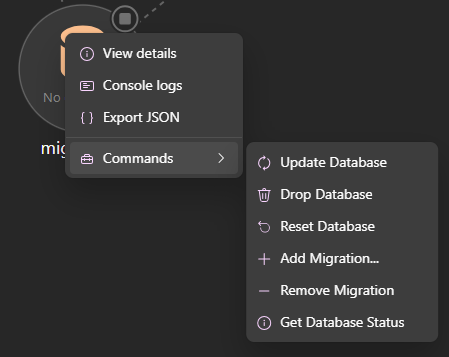
| Command | Description |
|---|---|
| Update Database | Apply pending migrations to the database |
| Drop Database | Delete the database (requires confirmation) |
| Reset Database | Drop and recreate the database with all migrations (requires confirmation) |
| Add Migration | Create a new migration |
| Remove Migration | Remove the last migration |
| Get Database Status | Show the current migration status |
Oh, and you get the publishing support of Aspire. EF migrations support multiple options for publishing including generating SQL scripts and creating a bundled executable. You can choose with PublishAsMigrationScript() and PublishAsMigrationBundle() methods chained to your migration resource.
The only feature truly missing day one is seeding. Seed data as part of EF is a key element to local development as you want to create a usable local environment with ease. For this, I still am falling back to the custom worker approach. I have customized the migration worker example to further create and modify data idempotently after migrations run. I hope this gets extended in the future to support seeding as part of the EF Core hosting story. I have some ideas on how that could look, but for now, it's a custom process.
This package is in preview, so there will be more features and improvements coming. If you are willing to bear the rough edges of preview software, give it a try. This just removed hundreds of lines of code from multiple codebases for me. I'm recommending it to my teams. However, if you need that seeding story implemented or want to wait for more polish, that's understandable too. Either way, this is a huge step forward in the story of managing EF Core migrations in Aspire applications and I'm excited to see how it evolves. Stay tuned for more content on this topic as I explore it further!