VF

Victor Frye
Your friendly neighborhood developer

It's been almost a full year since I first wrote about Aspire. At the time, I was so compelled by my experimentation about it and conferences were rejecting my talks on the technology, so I started this blog and published my first piece of content. My only production use of Aspire was experimental apps and personal projects. It was amazing, but projects I was professionally involved in were .NET Framework monoliths or Java applications (platforms that Aspire wasn't fully cooked for at the time). I could rant and rave about how cool the tool was, but using it in the wilderness of enterprise software development was a different story. I had no real-world experience to share and no real-world stories to tell.
Now, I do. Over the last six months, I have been using Aspire for production-bound enterprise distributed applications. In this post, I will be sharing the wins, the frustrations, and the lessons learned from real-world aspirifying of such apps. The actual code will not be shared given private nature of real applications, but the impact of course will be.
The application is a complex distributed system with multiple polyglot services and backing Azure PaaS resources. It's a greenfield project, so we had the opportunity to choose our tech stack and take advantage of the latest and greatest in many respects. We started with the production target model first. Of course, requirements evolved and more was added over time but we started with a familiar core set of technologies and components:
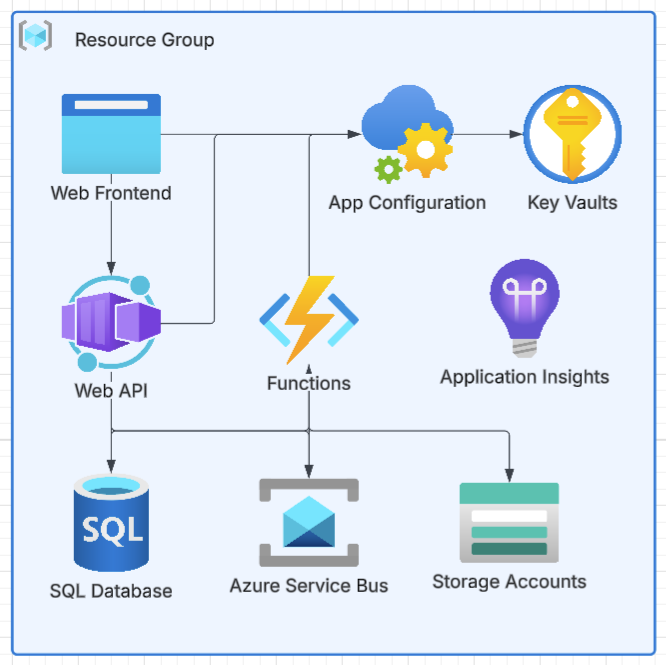
Already, it was pretty clear that this was going to be complex to model locally. I was very quick to suggest Aspire as the tool to save us. The team was on board, but had significantly less exposure to Aspire. Thus, we set out on a journey to learn how real-world aspirification would work for us. I have zero regrets about this decision.
From this reference architecture, we launched a project and started building. Production didn't exist yet, nor any staging or dev/test environments. We had a blank canvas and a dream. Ready, set, aspire!
I should mention that .NET was a core competency for the team, so we of course started with our backend web API. The team had mixed experience with cloud platforms, some from AWS backgrounds, some from Azure, some with little cloud experience at all. JavaScript was likewise a mixed bag, with most have experience but varying between frameworks. Thus Aspire was one of many new things we would be learning together rapidly. I admit, I felt comfortable with each component and framework, but this would be the first time I'd get to use Aspire in a real-world project with real-world stakes and issues to solve. Like many a dev, I was excited to use new shiny techs but nervous about the unknowns.
Oh, and AI assistants. None of us were heavy users at the starting point. Claude Code hadn't even been released yet. GitHub Copilot was still primarily a chat pane on the side of the IDE and high quality auto-completion.
Aspire allowed us to model the entire application locally, really fast, by hand. Like I imagined, aspire run became the default of the entire team for standing up our frontend, backend, and database. However, real-world applications get complicated fast.
I've already hinted at this, but we had no deployed environments at the start. Good reasons exist, but the outlook was months away at best. We like to deliver fast and start showing value to users as soon as possible, or at least demo-able software. This wouldn't work if we couldn't run the app with meaningful data persisted and a full solution running locally. Aspire was a lifesaver out of the box for the local environment. I want to emphasize this because for almost 5 months, this was our only environment. We didn't have a deployable environment for almost half a year. The solution quickly grew in complexity and scope, but Aspire kept up with it all. Starting with local first and Aspire became a key factor in our ability to continuing delivering and iterating on a complex distributed app without any deployed environments. End-to-end manual testing was easy and thus building out test automation also started with local testing with Aspire. We had a full solution running end-to-end before we had an actual remote database server or key vault.
We didn't have a deployed database server, so we had to use a local database. Aspire made this easy to set up with AddAzureSqlServer. However, the next step is meaningful test data and applying migrations. For this, we turned to our next escalation of use with Aspire. Use WithRef and WaitFor chains, we built a custom worker for local development that would run on start, apply any pending EF Core migrations, and seed the database with test data. This was a game changer for local development. We started with the migration service example in the docs but quickly evolved it to cover seeding our database as well as some other local-only setup tasks. These kinds of tasks previously required manual execution or a lot of custom scripting and docs to ensure each team member knew what to do to get a fully configured local system. Now, it became part of the aspire run experience and was fully automated. When we added new team members, we simply ensured they had the right tools installed like dotnet CLI, Aspire CLI, Node, and a Docker-compatible engine, and they got instant F5 experience with a fully running solution with test data. This was a huge win for onboarding and productivity.
I will note that this becomes a double-edged sword. It's so easy to run this local setup worker, but maintaining good test data becomes another chore. It always was a chore and thus often skipped by teams in the past, but now it's so easy to run that it becomes a question of "why not?" and a training problem of ensuring team members update the seeding logic when they make changes to the data model or need new scenarios.
I've understated the frontend requirements of this project. We had two JavaScript applications to manage: a standard web app and a plugin to another system. We had to keep these separate due to plugin requirements and deployment models, but we wanted to share as much code as possible between them. We also used a code generator to build a JavaScript SDK for our API. Together this turned into four different JavaScript projects to manage. We turned to npm workspaces to manage this, but it added a layer of complexity to our local development. Aspire has really begun to embrace JavaScript development with TypeScript app host and improved APIs like AddJavaScriptApp and WithNpm. However, we had to do some chaining of these to first run the workspace as its own JavaScript app with npm install and then run each individual project as its own app without a standalone install. The way npm workspaces and package resolution works, this became a headache to manage. Our package lock file was changing frequently due to different npm versions and packages being installed fresh and automatically even when not working on the frontends. We instead got creative using npm ci for the workspace install to prevent this but it made our inner loop significantly slower when starting the full solution.
Suffice to say, we were learning to manage JavaScript monorepos and how Aspire fits into that at the same time. I'm elated by how much more support for JavaScript and TypeScript development has been added to Aspire. I've reviewed the state previously and it's night and day from where we were at the start. I'd like to see monorepo support and npm workspaces, but this is a niche that comes from additional JavaScript usage of Aspire that we are on the forefront of. I'm hopeful that as more teams use Aspire for JavaScript development, we'll see more features and improvements in this area.
The old tradeoff was between using Azure PaaS resources for cloud-native runtime and infrastructure versus having an effortless local development experience. Aspire is making local-first development a priority. I don't know if Aspire is the only reason, but since its popularity has arisen I've noticed more and more Azure services providing emulators. These offer a local experience that allows us to develop and test against an Azure service in spirit without the real infrastructure behind it. All powered by containers. However, it's very important to understand an emulator is not the real thing. Azurite and the Azure Functions Core Tools are fantastic examples of this. They are mature, well-supported, and feature-rich where most developers will not find the notable differences.
For a long time, Service Bus was a glaring gap in the Azure emulation story. There was some third-party implementations but they weren't great. Now, we have the Azure Service Bus emulator which is a huge win for local dev. Combining Aspire with these emulators allows for a very simple setup of a Functions worker listening to a Service Bus topic without fighting multiple users of a deployed topic or needing to set up a separate Service Bus namespace in Azure.
Not all emulators are created equal. Sometimes, you don't need one. OpenTelemetry is the standard for observability instrumentation. Application Insights supports OpenTelemetry ingestion, but so does the Aspire Dashboard. In this case, we don't need an App Insights emulator because we really are just plugging and playing with OpenTelemetry endpoints. Environment variables and configuration should be the same. Locally, we can use app settings or user secrets and in the cloud we can leverage Azure App Configuration and Key Vault. The experience should be the same, so no emulator is needed. However, one gap we found was directional. OpenTelemetry is an output, environment config is an input. To get the same advantage of App Config locally, we want to set all configuration in one place and see it reflected in each downstream. Originally, we decided to use the App Config emulator for this but it's half-baked and didn't support the features we needed. We wanted to use a single json file that would be imported into App Config and imported into the local emulator, but the import endpoints aren't built for the emulator. The solution in Aspire was to leverage parameters and pass these to each app. This works, but it's verbose as every new setting needs to be added and passed through the chain to each app.
We got our deployment environments eventually. We decided not to use Aspire for deployment at this time. Our local environment was now more mature than our cloud model and Terraform support is still on the roadmap versus existing IaC already being written in Terraform. I love the idea of using Aspire to handle the local to cloud story, but we were overwhelmed with new patterns and tools.
This left us reverse engineering how our local model was working and translating that to cloud requirements. Our app workloads were all containerized, so that packaging wasn't complex. The biggest problem was configuration. Aspire WithRef allows us to effortlessly link resources together, but underneath is a bunch of connection strings. The shape of these took some reverse engineering and digging through Aspire code to replicate for our deployments. A creative pattern I found is Azure resources use a plain base url as a value when that's all that's needed and morphs into a ; delimited connection string when additional values are needed. This means a value could be https://victorfrye.com or Endpoint=https://victorfrye.com;Secret=keepitsafe dynamically. I only wish this was better documented or a ConnectionString type was exposed by Aspire client integrations. Oh well, wish lists are feedback for the future.
This brings us closer to our final aspirified system. The following systems were aspirified local model:
Again, there's some additional complexities in our real application but after building out our local model with Aspire, we had a lot of experience using Aspire in the real world. Without Aspire, our project would have failed. This is a fact, not an exaggeration. The system grew too complex too fast and blockers with a cloud environment would have prevented us from delivering value necessary. Like every tool, there's a learning curve and friction points, but the wins leave me with a renewed sense that Aspire is production ready and something other teams need to start considering for their own projects.